| 0:01 |
Owl: Welcome to Evaluating a Website, an instructional video on reading comprehension brought to you by the Excelsior University Online Writing Lab. |
| 0:16 |
There’s lots of information available on the internet. |
| 0:20 |
But how do you know which information is reliable? |
| 0:23 |
Not all websites are the same. |
| 0:25 |
Some are more trustworthy than others. |
| 0:29 |
Before you decide to trust the information you find on a website, you should evaluate it for accuracy and reliability first. |
| 0:37 |
In this video, I’ll go over two ways to evaluate a website. |
| 0:42 |
One way is to know what type of website you’ve found. |
| 0:46 |
I’ll list the most common types of websites and describe what they do. |
| 0:50 |
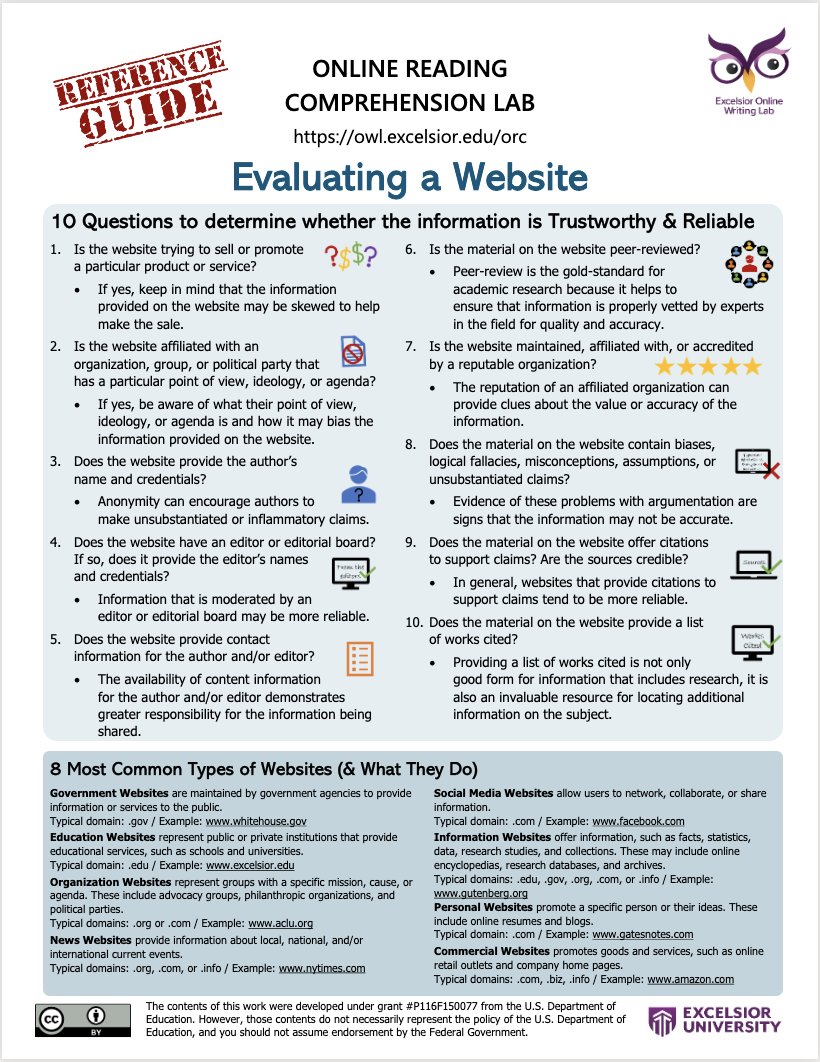
Another way to evaluate websites is by applying a set of ten questions to judge the accuracy and reliability of the site. |
| 0:58 |
Let’s get started! |
| 1:01 |
There are different types of websites. |
| 1:03 |
I’ll go over eight of the most common types so that you have a better idea of what they do and which one is right for you. |
| 1:10 |
I’ll give you a description and example for each one, plus the typical domain each one has. |
| 1:17 |
The domain is indicated by the letters after the period at the end of the website address. |
| 1:22 |
Ok, let’s go over the list! |
| 1:26 |
The first type is government websites. |
| 1:29 |
These websites are maintained by government agencies to provide information or services to the public. |
| 1:36 |
Their typical domain is .gov. |
| 1:40 |
An example is www.whitehouse.gov. |
| 1:47 |
The next type is education websites. |
| 1:50 |
These websites represent public or private institutions that provide educational services, such as schools and universities. |
| 1:58 |
Their typical domain is .edu. |
| 2:01 |
An example is www.excelsior.edu. |
| 2:07 |
Another type of website is an organization website. |
| 2:11 |
These websites represent groups with a specific mission, cause, or agenda. |
| 2:16 |
They include advocacy groups, philanthropic organizations, and political parties. |
| 2:22 |
Their typical domain is .org or .com. |
| 2:27 |
An example is www.aclu.org. |
| 2:33 |
Some websites are informational. |
| 2:35 |
These websites provide information, such as facts, statistics, data, research studies, and collections. |
| 2:44 |
These websites may include online encyclopedias, research databases, and archives. |
| 2:50 |
Typical domains can include .edu, .gov, .org, .com, and .info. |
| 3:00 |
An example is www.gutenberg.org, which is a free online archive of ebooks. |
| 3:09 |
Other websites focus on providing news. |
| 3:12 |
They provide information about local, national, and/or international current events. |
| 3:18 |
Typical domains include .org, .com, or .info. |
| 3:23 |
One example is www.nytimes.com. |
| 3:29 |
Many websites fall in the category of social media. |
| 3:33 |
These websites allow users to network, collaborate, or share information. |
| 3:38 |
Their typical domain is .com. |
| 3:41 |
One example is www.facebook.com. |
| 3:47 |
Then there are personal websites. |
| 3:49 |
These websites promote a specific person or their ideas. |
| 3:53 |
These include online resumes and blogs. |
| 3:56 |
Their typical domain is .com. |
| 3:59 |
An example of a personal website is Bill Gates’ blog, which you can find at www.gatesnotes.com. |
| 4:08 |
Finally, there are also many commercial websites. |
| 4:11 |
These websites promote goods and services, such as online retail outlets and company home pages. |
| 4:18 |
Typical domains include .com, .biz, and .info. |
| 4:24 |
An example is www.amazon.com. |
| 4:29 |
There are other types of websites, and many more sub-categories of websites. |
| 4:34 |
Visit this Wikipedia article for a more complete list of website types: https://en.wikipedia.org/wiki/Website#Types_of_website |
| 4:41 |
Knowing the type of website will give you a better idea of whether the information it offers is right for you. |
| 4:47 |
However, you should also apply these ten questions to determine whether the information is trustworthy and reliable. |
| 4:55 |
1. Is the website trying to sell or promote a particular product or service? |
| 5:02 |
If yes, keep in mind that the information provided on the website may be skewed to help make the sale. |
| 5:09 |
2. Is the website affiliated with an organization, group, or political party that has a particular point-of-view, ideology, or agenda? |
| 5:20 |
If yes, be aware of what their point-of-view, ideology, or agenda is and how it may bias the information provided on the website. |
| 5:30 |
3. Does the website provide the author’s name and credentials? |
| 5:35 |
Anonymity can encourage authors to make unsubstantiated or inflammatory claims. |
| 5:41 |
4. Does the website have an editor or editorial board? |
| 5:46 |
If so, does it provide the editors’ names and credentials? |
| 5:51 |
Information that is moderated by an editor or editorial board may be more reliable. |
| 5:57 |
5. Does the website provide contact information for the author and/or editor? |
| 6:03 |
The availability of contact information for the author and/or editor demonstrates greater responsibility for the information being shared. |
| 6:12 |
6. Is the material on the website peer-reviewed? |
| 6:16 |
Peer-review is the gold-standard for academic research because it helps to ensure that information is properly vetted by experts in the field for quality and accuracy. |
| 6:27 |
7. Is the website maintained, affiliated with, or accredited by a reputable organization? |
| 6:35 |
The reputation of an affiliated organization can provide clues about the value or accuracy of the information. |
| 6:43 |
8. Does the material on the website contain biases, logical fallacies, misconceptions, assumptions, or unsubstantiated claims? |
| 6:52 |
Evidence of these problems with argumentation are signs that the information may not be accurate. |
| 6:58 |
Click here to learn more about how to evaluate an argument for problems such as unsupported claims, assumptions, and logical fallacies. |
| 7:07 |
9. Does the material on the website offer citations to support claims? |
| 7:13 |
Are the sources credible? |
| 7:15 |
In general, websites that provide citations to support claims tend to be more reliable. |
| 7:21 |
However, the sources of evidence also need to be evaluated for credibility by applying these ten questions. |
| 7:29 |
10. Does the material on the website provide a list of works cited? |
| 7:34 |
Providing a list of works cited is not only good form for information that includes research, it is also an invaluable resource for locating additional information on the subject. |
| 7:46 |
Keeping these questions in mind as you locate and evaluate websites will help you to make the best decision about which information to trust. |
| 7:57 |
Thanks for listening to this instructional video on Evaluating a Website! |
| 8:02 |
Visit the Excelsior University Online Writing Lab for more support with reading and writing skills. |